> ## Documentation Index
> Fetch the complete documentation index at: https://lindyai-docs-email-alerts-update.mintlify.site/llms.txt
> Use this file to discover all available pages before exploring further.
# Meeting Prep
> Automatic pre-meeting briefings with attendee research, past context, and agenda
## Never Walk Into a Meeting Blind
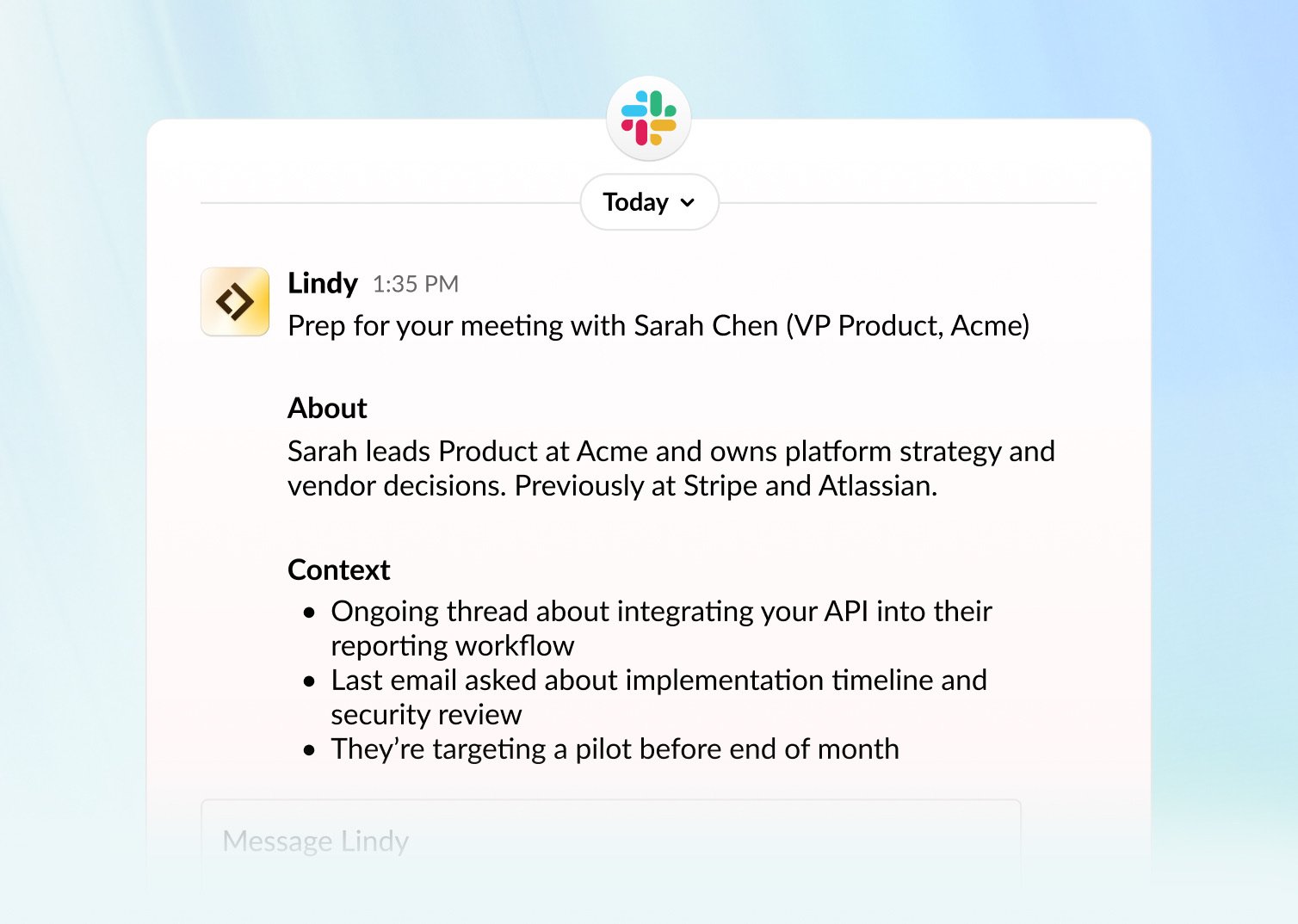
Delegate meeting prep to Lindy. Before every call, a briefing lands in your inbox or on your phone with who you're meeting, what you've discussed before, and what's on the agenda. You don't have to ask.
## How to Set It Up
Open Lindy, click your **workspace name** in the top-left, and choose **Settings**. In the left sidebar, click **Meetings**, then scroll to **Meeting prep**.
## What's Included
| Section | Details |
| -------------------- | ------------------------------------------------------------------------ |
| **Time** | When the meeting is scheduled |
| **Meeting name** | The title and subject |
| **Attendees** | List of all participants |
| **Attendee context** | For external attendees: job title, current company, and LinkedIn profile |
| **Past meetings** | Summary of previous meetings with the same people (if recurring) |
 You can customize the prep format in your settings at [chat.lindy.ai](https://chat.lindy.ai). Look for **Meeting prep** in the settings panel. Describe your preferred structure, tone, and level of detail in the text field, and Lindy follows your instructions.
## Which Meetings Get Prep
* **All meetings**: every event on your calendar
* **External meetings only**: skip internal team syncs, focus on client and prospect meetings
## When You Receive Prep
To adjust these settings, go to **Meetings** in your Lindy settings, scroll down to **Meeting Prep**, and configure the time.
* **Daily digest**: receive all meeting prep at a set time each day (e.g., 5:00 AM)
* **Before each meeting**: receive prep a set number of minutes before the meeting starts (e.g., 15 minutes before)
You can enable one or both.
## How You Receive Prep
* **Email**: lands in your inbox
* **SMS / iMessage**: sent directly to your phone
To change how you're notified, go to **Meetings** in your Lindy settings, scroll down to **Meeting Prep**, and update your notification preferences.
## Customize Your Prep Format
You can write a custom prompt to control exactly how your meeting prep is written — including the tone, structure, and level of detail.
You can customize the prep format in your settings at [chat.lindy.ai](https://chat.lindy.ai). Look for **Meeting prep** in the settings panel. Describe your preferred structure, tone, and level of detail in the text field, and Lindy follows your instructions.
## Which Meetings Get Prep
* **All meetings**: every event on your calendar
* **External meetings only**: skip internal team syncs, focus on client and prospect meetings
## When You Receive Prep
To adjust these settings, go to **Meetings** in your Lindy settings, scroll down to **Meeting Prep**, and configure the time.
* **Daily digest**: receive all meeting prep at a set time each day (e.g., 5:00 AM)
* **Before each meeting**: receive prep a set number of minutes before the meeting starts (e.g., 15 minutes before)
You can enable one or both.
## How You Receive Prep
* **Email**: lands in your inbox
* **SMS / iMessage**: sent directly to your phone
To change how you're notified, go to **Meetings** in your Lindy settings, scroll down to **Meeting Prep**, and update your notification preferences.
## Customize Your Prep Format
You can write a custom prompt to control exactly how your meeting prep is written — including the tone, structure, and level of detail.
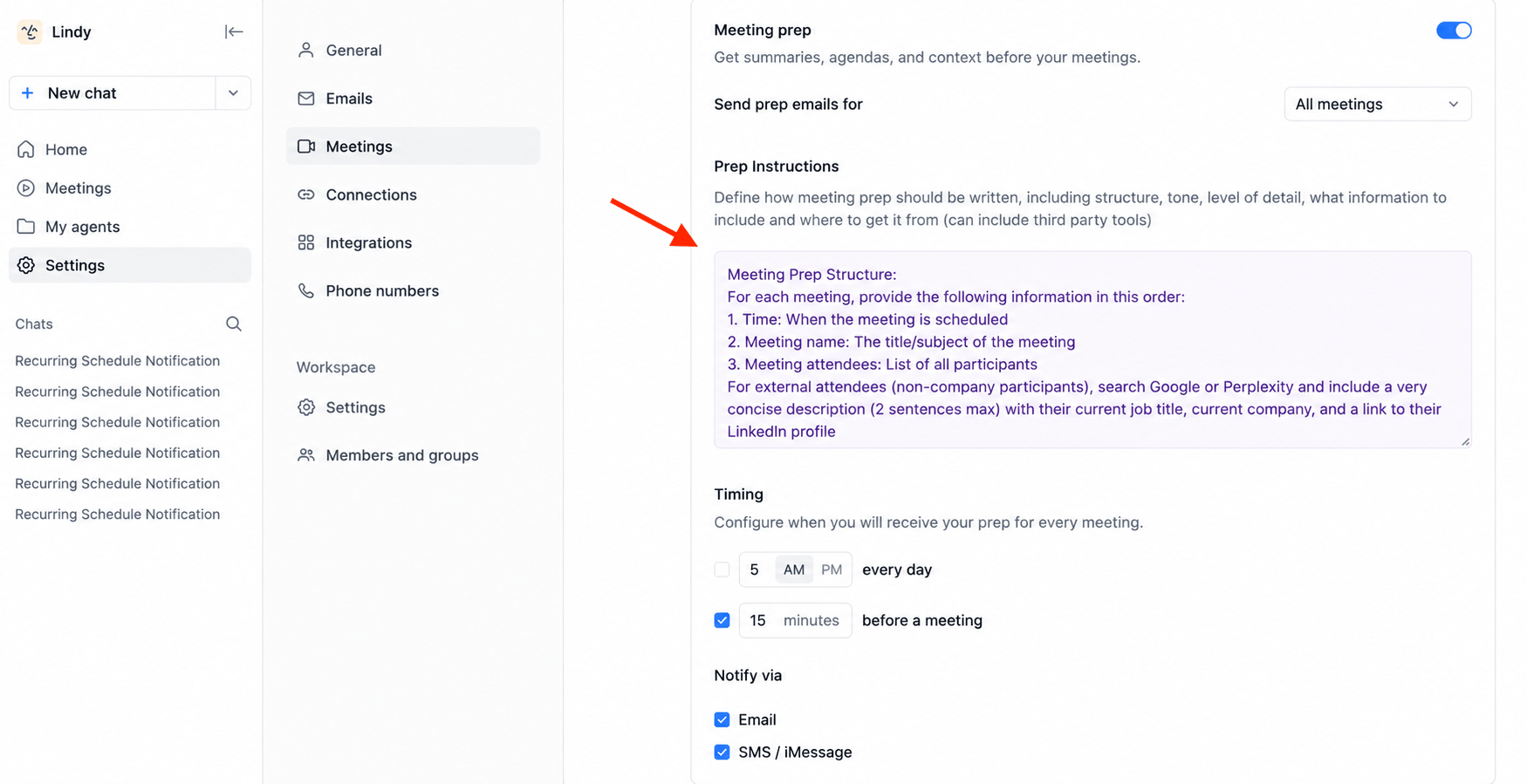 To update it, go to **Meetings** in your Lindy settings, scroll down to **Meeting Prep**, and edit the prompt field.
## Next Steps
How Lindy records and summarizes your meetings
Automatic post-meeting follow-ups
To update it, go to **Meetings** in your Lindy settings, scroll down to **Meeting Prep**, and edit the prompt field.
## Next Steps
How Lindy records and summarizes your meetings
Automatic post-meeting follow-ups